
My first project is done!
1st of January, 2026 ★ programming ★ ~8.5 minute read
Around mid-to-late December of 2025 I started working on my first project ever. I called it todo-lister, and started working on it every single day, for about 15-30 minutes every single day or more, if I had the time. And, I can say now that V1.0.0 of todo-lister is officially out! The source code, and the release can be viewed here.
Okay, first off I have to say that this isn't my first project, far from that. I started making them in high school, but the thing is, I never finished any. There were many cool little ideas I had (from what I remember, I made a Madlibs game, a morse-to-text translator, and a couple of other projects), but the thing is, they were started, and I would work on them for a week or so, stop, and forget about it. And probably the worst thing is, when I decided to work on a new project, I saw the old one, and would delete it.
Yup, most of these projects are lost to time. danin317 lost media. I am not joking by the way. There isn't really any justifiable reason for this, and what added the salt to the wound was that I hesitated to start some projects because they were too "small" and "simple".
To not drag on, because this way of thinking is rather unhealthy and I am not satisfied with my past actions on this, I decided now that I got back into programming that I would swallow my pride and ego, and start simple. I laid out three projects that I wanted to make, and the first one was a todo list, and I set myself a restriction to work on only this before going to the next personal project.
Now, a todo list is the most beginner-friendly project a new programmer can make. It should take around 50 lines of code, and it's simple file manipulation. I started working on it at a perfect time actually, because we just finished working with files in university, so I was very accustomed to the idea.
Since we're doing Python in university, and right now I am fairly familiar with Python, I decided that it was going to be my choice of language for this project. I actually got very serious with my project organization, and made a Trello account specifically for personal projects. My idea was this: to start very simple, and then add onto the project. That was my biggest issue when I first started doing projects, I thought way too wide and deep without even writing a single line of code, thinking what would be a good idea to optimize the code so it can work on a bigger scale. This way I'll already lay out the foundation, and just work on top of it.
Before I continue, I must specify that I didn't want to make this a regular todo list. Well, it is still a regular todo list, but this project,
if I only added the ability to add a task, view the task, and remove a task, then it would take me an afternoon of coding to get it done. I wanted
something a little bit bigger, so I decided, apart from the basic functionality of the todo list, to add these features as well:
★ The ability to add multiple tasks in one go
★ The ability to remove multiple tasks in one go
★ Writing to a markdown format
★ Making a unique file for each individual day
★ Adding low, medium, and high priorities to the task
★ Assigning time intervals to tasks
★ Ability to sort tasks by time
★ Ability to run the program without Python
Now, this does sound like a lot, but it honestly isn't. Or maybe it is, and I'm just underplaying it because I don't want to sound smart as a beginner programmer. Also, something I should mention is I didn't think of screenshotting the process of me creating the program. So I can't talk the project in that much detail unfortunately.
Something I should also mention is that for this project, and all of the upcoming ones I want to create, I refrained myself from using artificial intelligence, and I also tried to use Neovim. I usually use VSCode, but since I have friends who wanted me to try Neovim, I decided to set it up specifically for this project, and I have to say that I am already using it for other projects, too. As for the AI part, I am not that much anti-AI (I am for sure anti-generative AI though), and I do believe that in VERY specific uses the usage of AI can be good, but in my opinion not for personal projects. I wanted to learn, and fix the problems myself.
I first want to talk about the file creation process. Check it out:
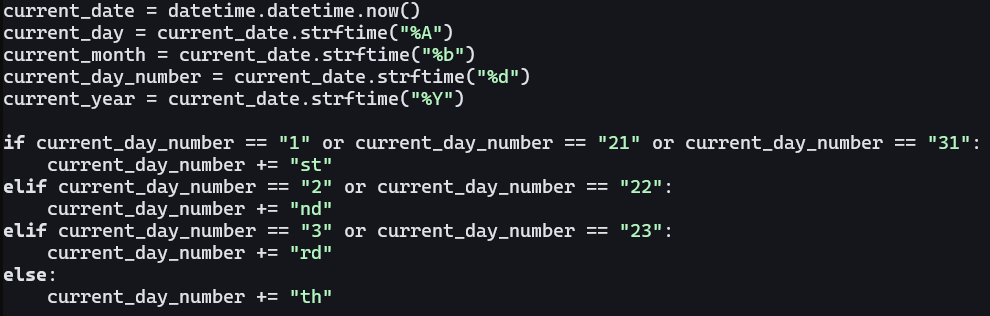
I used the datetime module, and wanted to get the current day, month, and year, because I wanted to name each file like:
todo current_day current_day_in_number of current_month current_year. For example, todo 8th of February, 2025. And me
checking which day it is, is rather... well, I'd say unintuitive. There probably is a built-in function for this, but this
works too. Since a month has at maximum 31 days, and the information from the datetime.datetime.now() function returns a string,
I just checked which day it is, and append the corresponding end to it.
Then I simply just made the file like this:

Which is most likely unintuitive as well, since I most likely could've removed the underscores to separate the date, but oh well. I can always improve on the program.
The next thing I wanna talk about is the create_task() function, which is where most of the stuff is happening.
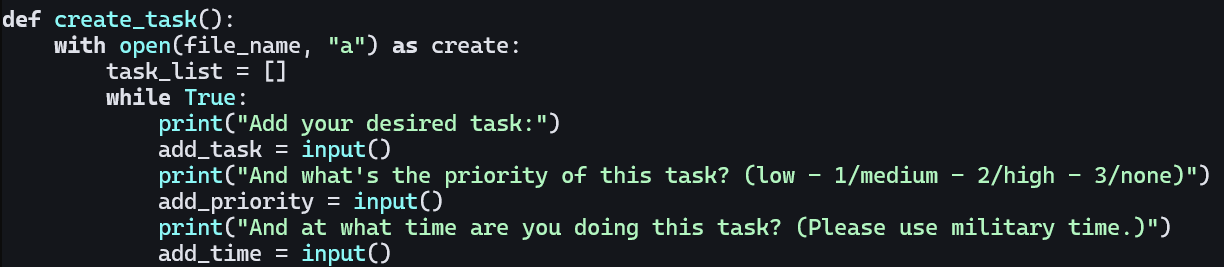
This is the first part of it. I made a list to store all of the entered tasks, and then how I made the functionality of adding more tasks is through a while loop, that eventually stops when a user does not want to enter any more tasks. This also means that you can only enter one task at a time, which I honestly right now don't mind, especially because you enter the name, then the priority, then the time frame. Also, as you can see, you can only add military time. All of these restrictions are mostly because I wouldn't even know how to start implementing the feature to add multiple tasks in one go, along with a timeframe such as, for example, 9:00AM - 12:00PM.
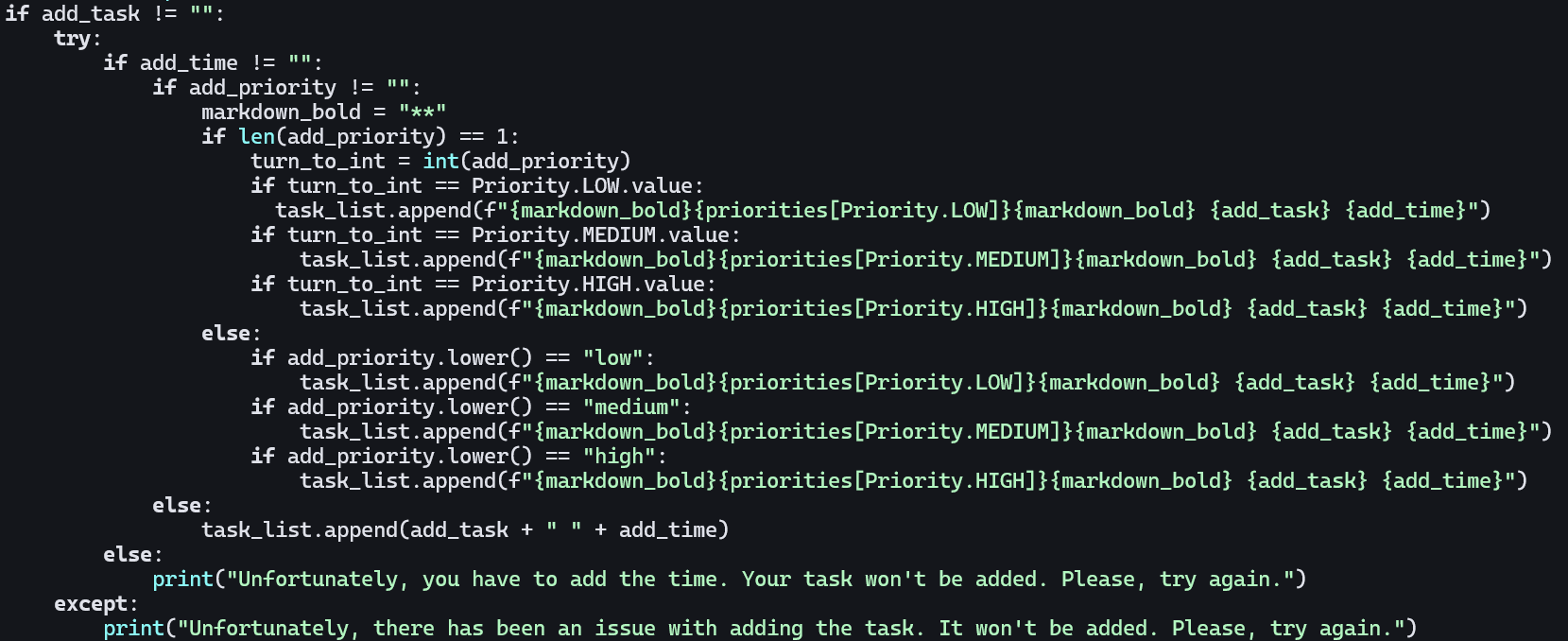
Now, I do realize that I just Haduken'd the code, but it is checking for a lot of stuff. This is also the main part of the priority part of the code. The reason as to why it checks for the time first is because I made it mandatory for the user to enter the time. As you can see, you don't have to enter the priority, but for the program to work well, you just have to enter a time.
As for the priorities themselves, if you saw from the previous image I allowed the user to enter either a number, or text, so I checked the priority twice. Now that I'm writing this, I probably could've checked it in one line, but I remember Python giving me errors about this, so I decided to separate it and never touched it since. You can also see that I used enums for this, and this is actually my first time using them! This is how they look:
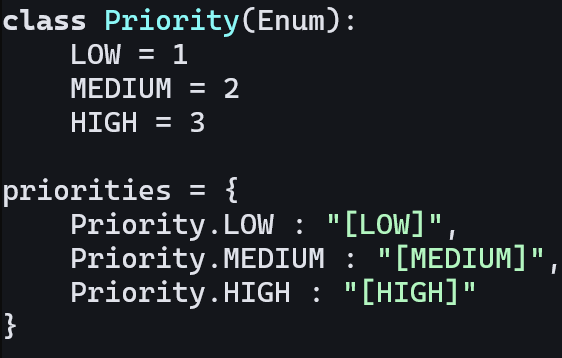
Not that complicated.
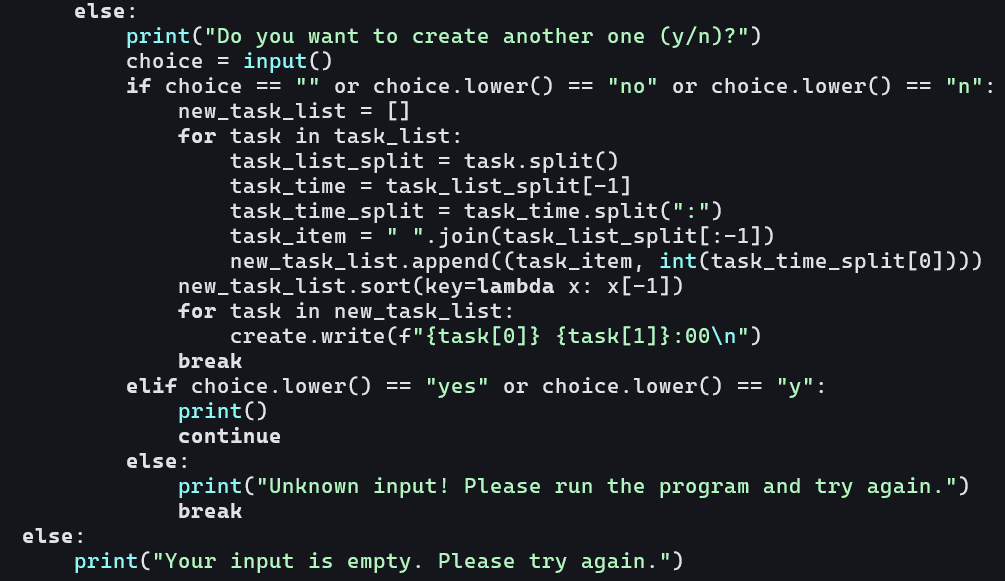
Now, the final part of the function. Funnily enough, this part of the code is for the time sorting. I remember having an exercise like this for university, where we had to go through a file and sort it in a particular way, so I used a similar principle. It first splits the string, then it splits the time by the ":" to be able to get the first number. Then it stores the rest of the task, along with the time into a new list. Is this complicated? Yeah. Was there an easier way of doing this? Most likely. But hey, if it works, it works :)
Now, I would continue and talk about the other functions, which are view_task() and remove_task(), but there's really nothing new for me to say, it's mostly the same as a regular todo list program.
For remove_task(), I managed to add the ability to remove multiple tasks the same way I did for create_task(), and that is through a while loop that breaks after the users doesn't want to remove anymore tasks:
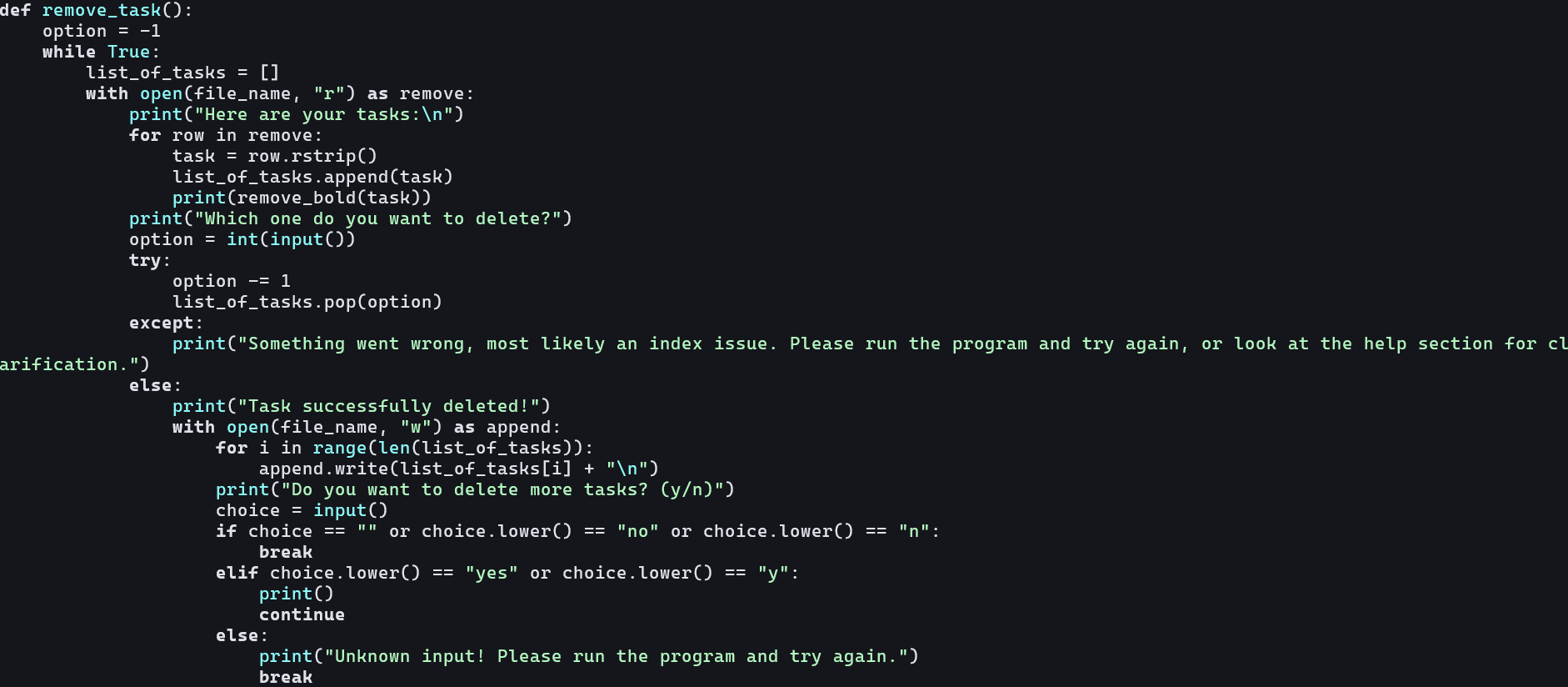
And apart from that, the only special thing is that it lists which tasks you want to remove. I also made is so you don't choose the literal index of the task. So, since the first index would be zero, it will now be one.
Before moving on, I just have to linger for a tad bit and talk about view_task():
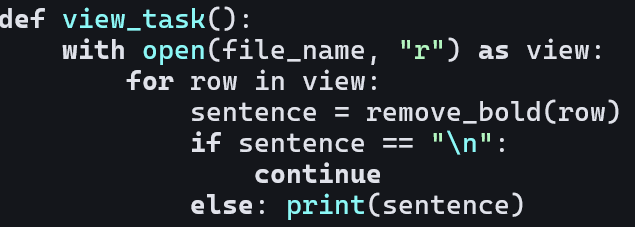
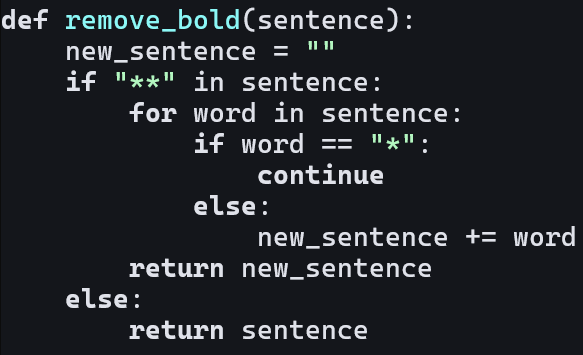
For as unamusing as it is, I do have to mention the remove_bold() function. You see, I saved to a Markdown file, and you can use special characters to bold the text. I did that with the priorities, and the thing is, even though in a Markdow preview you don't see the asterisks, they're still there. So I made a special function that goes through the row and just removes them:
After I made all of that, I was really satisfied with myself. I'll talk about it more at the end, but I finally managed to create something and not drop it after a week. Now, it was time to turn it into an .exe and be done for now.
You see you can't compile a Python file into an .exe file, you have to use a library called PyInstaller. Which requires pip. Now, I have to say that I didn't have the package manager yet. I followed the instructions on their website, only to be greeted with... an error. pip couldn't find the right Python files, and to be brief: I spent like 30 minutes trying to fix this. I had no idea why pip couldn't find python.exe, even though I had Python installed... which I already had to because otherwise I couldn't get pip.
So, after reinstalling Python for like the 5th time I lost my temper and manually put the .exe files in the folder it was looking for python.exe and it worked. Not complaining, really. I installed PyInstaller, and made the .exe file, and put it into the Releases part of the Github repository!
To be honest, as silly as this sounds, I am happy to be able to properly finish my first project. Now, I am aware that you don't ever finish a project and keep mainting it, but the first version is out. I have no idea what I'll add more, it'll probably just be small fixes. It has been a fun experience, trying to find the bugs and fix them myself, and I learnt a lot of stuff, too.
As for my next project, I'll for sure keep it in the "productivity" area, as it's a topic that interests me. If you read through the end, thank you very much :) and hopefully you'll be there for my new projects.